The Coast Guard recently launched BATS, a start-to-finish bonus processing system designed to cut paperwork and speed up payments, while giving everyone involved real time visibility into where a bonus stands.
BATS, which is short for Bonus Accountability and Tracking System, turns the entire bonus process into a seamless digital workflow. Here’s what you need to know:
How BATS works
You can find detailed user guides for BATS on the BATS SharePoint site, but the process basically looks like this:
- Members start the request. By going to the BATS Bonus Home Dashboard Screen (which you can access from the SharePoint site), you can log in, review eligibility, and have BATS generate the correct FY26 form for you. (EB Annexes still use PDFs, which you’ll upload.)
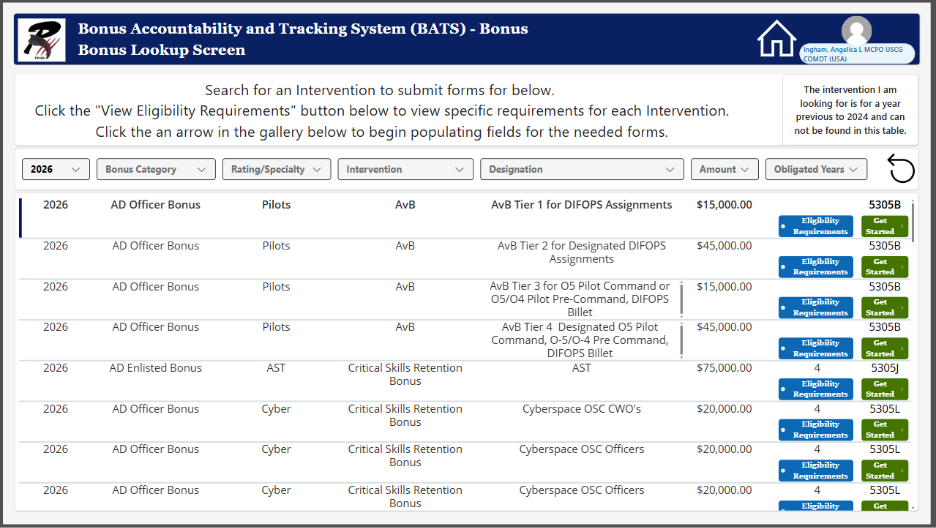 Once logged in, members can look up bonuses to review eligibility requirements and then automatically generate the correct bonus form by clicking a button. Once logged in, members can look up bonuses to review eligibility requirements and then automatically generate the correct bonus form by clicking a button. |
- BATS routes the request. All members need to do is select the Unit POC, YN, or CO’s name and the request is routed automatically. If you’re unsure who to send it to, just enter the Unit POC and they can add the rest of the routing chain. No emailing forms or guessing the next step.
- Approvers work from a built-in inbox. Unit POCs, Yeoman, COs and Program Managers see exactly what needs their attention, review it, sign it digitally, or send it back for fixes.
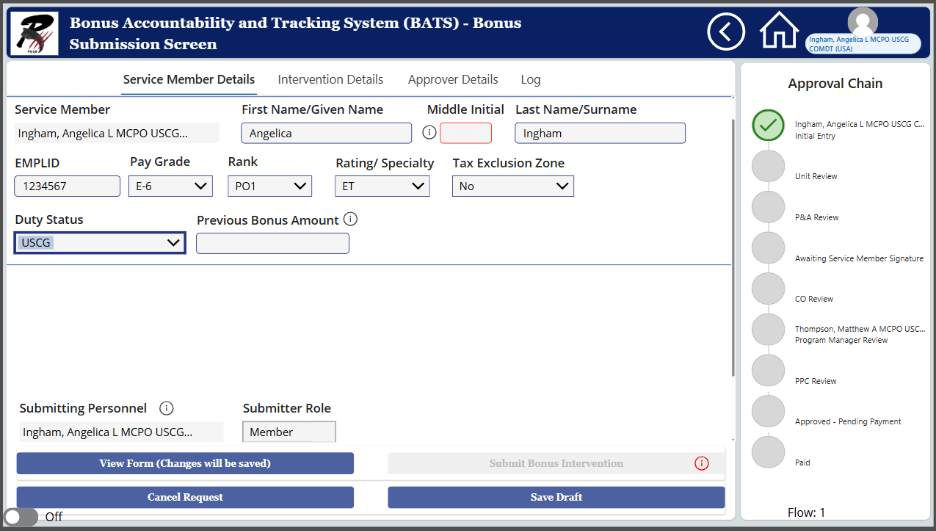 BATS allows members to see details of bonuses and track approval progress in real time. BATS allows members to see details of bonuses and track approval progress in real time. |
- You track it in real time. At any moment, you can see where your request is and who has it. No waiting and wondering.
- PPC processes payment. Once fully approved, PPC pays the bonus through BATS. If something is off, they return it with comments you can read immediately.
The best part? Everything happens in one shared system.
What you can expect
Here are the changes that take effect immediately:
Who does what
Training and Guides
Where to find BATS
Portal link, job aid, and technical support:
https://uscg.sharepoint-mil.us/sites/USCG-CGCC-R3/SitePages/BATS.aspx
Need help?
Submit questions or issues through the New Inquiry form inside BATS.
-USCG-